How to Migrate from SaaShost.net to Office 365?
-
 Last updated: 29 December 2025
 Migration
-
 Editorial Team
Microsoft Office 365 is the leading choice for businesses seeking a comprehensive suite of productivity and collaboration tools. Its cloud-based model guarantees a 99.9% uptime for your business emails and provides a scalable, cost-effective platform to grow your user base and data storage seamlessly.
However, if your organization’s Microsoft 365 services are currently managed by a third-party provider like SaaShost.net, you are not experiencing the full, unrestricted potential of the platform. To take direct control of your security, administration, and billing, a migration to your own Office 365 tenant is necessary. This article will serve as your guide, detailing how to successfully migrate from SaaShost.net to Office 365.
Why Migrate from SaaShost.net to Office 365?
While both SaaShost.net and Apps4Rent are Microsoft partners, the level of control, flexibility, and support we provide is fundamentally different. By migrating from SaaShost.net to an Office 365 tenant managed by Apps4Rent, you gain a partnership that delivers enhanced administrative autonomy and directly supports your long-term strategic goals. We believe you should have full visibility and control over your environment.
By making this move, you unlock a superior tier of administration and support, with key benefits including:
- Full Administrative Control: Gain complete ownership over your Microsoft 365 tenant. Configure security policies, manage user permissions, and install third-party applications without restrictions.
- Direct Licensing and Billing: Simplify your accounting by purchasing licenses directly from Microsoft or a flexible partner. Avoid bundled pricing and pay only for the services you need.
- Access to the Full Microsoft 365 Suite: Enjoy untethered access to the entire ecosystem, including advanced security centers, compliance managers, and the full suite of Power Platform tools, which are often limited in partner-managed environments.
- Enhanced Security and Compliance: Take direct responsibility for your organization’s security posture by leveraging advanced features like Microsoft Defender for Office 365, data loss prevention (DLP), and custom compliance policies tailored to your industry.
- Simplified Ecosystem Consolidation: If your company has multiple tenants, migrating from SaaShost.net provides a clean starting point to consolidate into a single, unified environment for better collaboration and management.
- Automation and Workflow Integration: Office 365 works seamlessly with Power Automate (formerly Microsoft Flow), enabling organizations to automate routine tasks and connect workflows across multiple applications. This simplifies operations, minimizes errors, and boosts overall efficiency.
Key Considerations Before You Migrate from SaaShost.net to Microsoft 365
A successful migration hinges on careful preparation. Addressing these areas beforehand will significantly reduce risks and ensure a smoother transition for everyone involved.
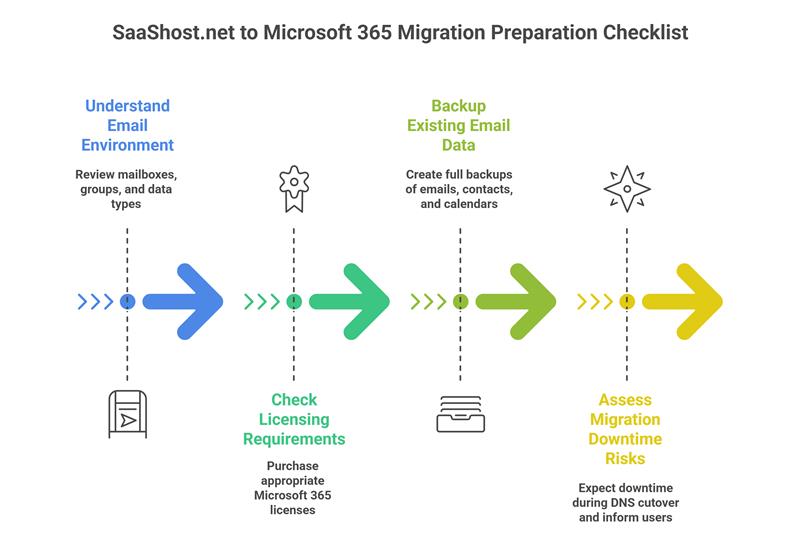
- Understand Your Email Environment: Begin by taking a full inventory of your current SaaShost.net setup. Document all user mailboxes, shared mailboxes, distribution groups, and aliases. Identify what data needs to be moved, including emails, contacts, calendars, and tasks, as different migration methods support different data types.
- Check Licensing Requirements: You will need to procure new Microsoft 365 licenses for your new tenant. Evaluate your organization’s needs to select the right plan (e.g., Business Premium, E3) that offers the necessary features and compliance tools. Ensure that you have a license for every user.
- Backup Existing Email Data: Before initiating any migration steps, create a complete backup of all critical data. This includes exporting PST files for mailboxes and ensuring you have copies of contacts and calendars. This backup serves as a crucial safety net in the unlikely event of a migration issue.
- Assess Migration Downtime Risks: A migration will inevitably involve a period of downtime, primarily during the final DNS cutover when email routing switches to the new system. Plan this cutover during a period of low business activity and communicate the expected timeline clearly to all users to minimize disruption.
Pre-Migration Requirements for SaaShost.net to Microsoft 365 Migration
If you plan to handle the SaaShost.net to Office 365 migration on your own, make sure you have the following details and access ready before starting the process:
- Access to your SaaShost.net administrator account
- A new Microsoft 365 tenant with Global Administrator access
- Login credentials for all user mailboxes to be migrated
- A list of your domains and current DNS settings
Having these essentials in place helps ensure a smooth and well-organized migration. However, if you choose Apps4Rent’s Office 365 migration services, our experts handle these steps for you, making the entire process far simpler and hassle-free.
Steps to Migrate from SaaShost.net to Microsoft 365
For a more structured approach, especially for larger organizations, breaking the migration into distinct phases is highly recommended.
Phase 1: Preparation
A thorough preparation phase is the cornerstone of any successful migration. This involves conducting a complete inventory of your source tenant, including all users, licenses, and data. Concurrently, you will create corresponding users and security groups within your new target tenant. Perhaps most importantly, you must develop a clear communication plan that informs all users of the migration timeline and the expected downtime.
Phase 2: Domain Management
This phase is critical for establishing your identity in the new tenant. You will need to remove your primary domain (e.g., yourcompany.com) from the SaaShost.net tenant. Once released, you can add and verify ownership of the same domain within your new Microsoft 365 admin center, proving that you have the authority to manage it.
Phase 3: Data Migration
You will set up a new migration project within the tool, providing the administrative credentials it needs to access both your source and target tenants. The process typically involves an initial pre-stage migration to copy the bulk of historical data, followed by multiple incremental syncs and a final pass to capture any recent changes just before cutover.
Phase 4: The Cutover
The cutover is the moment of transition. After performing the final data sync, you will update your domain’s MX records and other critical DNS entries to point to Office 365. This is when you officially instruct all users to close their email clients and begin logging into the new Office 365 tenant, as all new emails will now be delivered there.
Post-Migration Steps After Migrating from SaaShost.net to Office 365
Completing the data transfer is a major milestone, but a few final steps are essential to wrap up the project cleanly and ensure long-term stability. The work is not quite done once the data has been moved. In this final phase, you will assign the appropriate Microsoft 365 licenses to each user in the new tenant. Users will likely need to reconfigure their Outlook profiles to connect to the new service. Finally, you can proceed to decommission the old subscriptions and services with SaaShost.net, ensuring you are no longer billed for them.
- Remove SaaShost.net Domain from Old Accounts: Once you have confirmed that all services are running smoothly in Office 365, return to your old SaaShost.net control panel and formally remove your domain from their system. This prevents any potential conflicts and confirms the domain is fully under your new management.
- Ensure DNS Propagation: After updating your DNS records, remember that it can take 24 to 48 hours for these changes to propagate across the internet globally. Use online tools to verify that the new records are active worldwide.
- Verify Mail Flow and Access: Conduct thorough tests by sending and receiving emails both internally and externally. Confirm that all users can successfully access their mailboxes through Outlook on the web, desktop clients, and mobile devices.
- Conduct Final Data Integrity Checks: Perform random spot checks on a selection of user mailboxes. Verify that folders, calendar entries, and contact lists appear complete and accurate, giving you full confidence in the integrity of the migrated data.
What Are the Challenges in SaaShost.net to Office 365 Migration?
Undertaking a SaaShost.net to Office 365 tenant-to-tenant migration is a complex technical project. Being aware of the potential challenges allows you to prepare for them effectively.
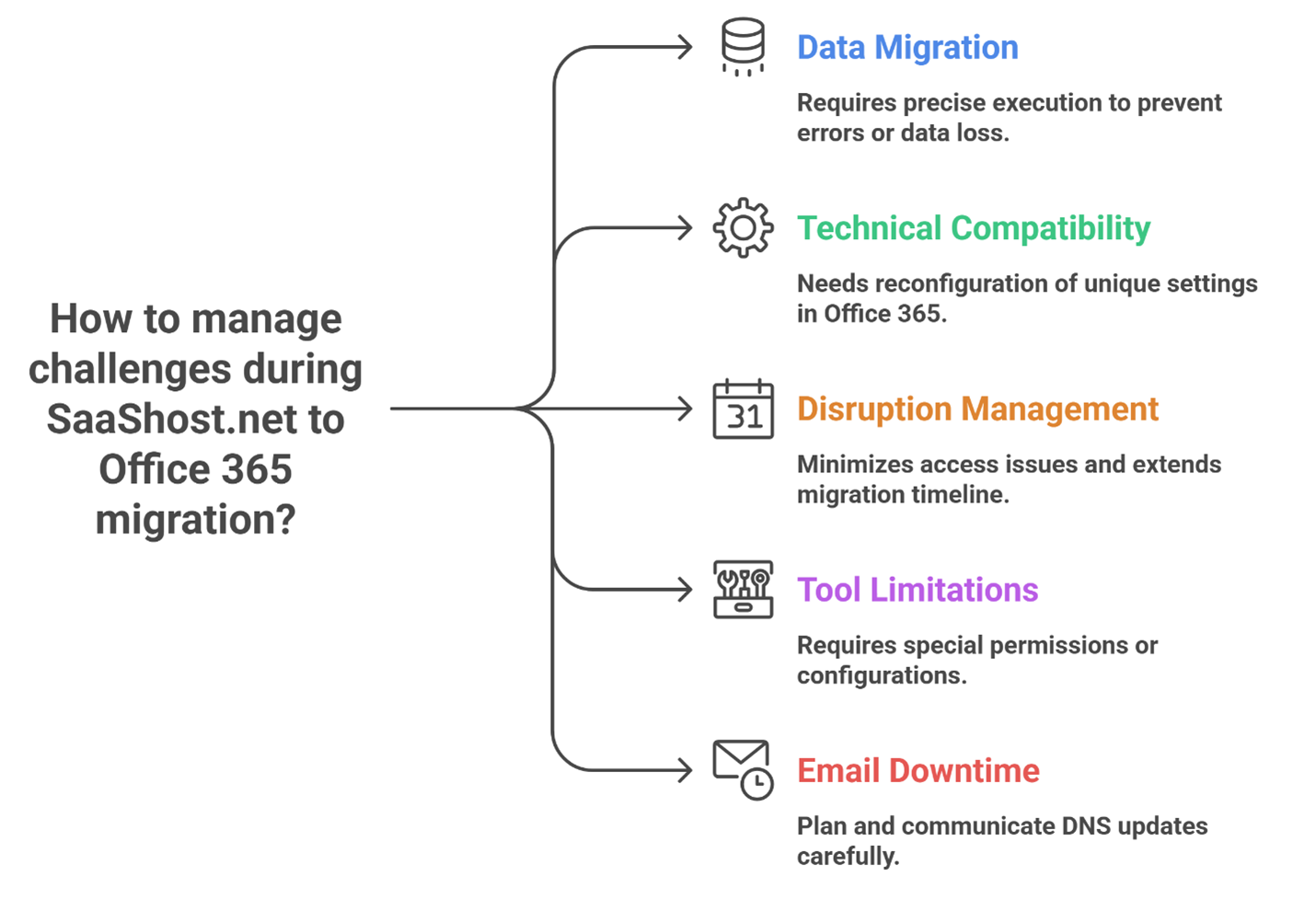
- Data Migration Complexity: Transferring terabytes of data, including emails, attachments, and complex calendar items, between two live environments requires meticulous planning and robust tools to avoid data corruption or loss.
- Technical Compatibility: While both platforms are Microsoft 365, the SaaShost.net environment may have custom configurations or limitations that are not directly transferable, requiring careful reconfiguration in the new tenant.
- Disruption During Migration: Despite best efforts, the migration process carries an inherent risk of disruption. Network instability or unexpected errors during the data sync can impact the timeline.
- Migration Tools Limitations: While powerful, migration tools have their own learning curves and may require specific permissions or configurations to function correctly with a partner-managed source like SaaShost.net.
- Email Downtime During Transition: The switch in DNS records, which redirects email flow, will result in a period of downtime. This must be carefully planned and communicated to minimize business impact.
Apps4Rent Can Help with SaaShost.net to Office 365 Migration
Email migration is a specialized task that, while methodical, can be long and tedious. The potential for errors that could impact business operations is a significant risk. Apps4Rent provides expert Office 365 migration services to seamlessly move your email and data to Microsoft with 24/7 support, aiming for zero data loss and minimal downtime.
As a Microsoft Solutions Partner, Apps4Rent can not only help you acquire the right Microsoft 365 subscriptions but also manage the entire migration from SaaShost.net to your new tenant using proven strategies. Our Microsoft-certified migration experts are available around the clock via phone, chat, and email to ensure your transition is smooth and hassle-free.
FAQs Related to SaaShost.net Email Migration to Office 365
-
How do I migrate out of SaaShost.net?
To migrate out, you need to set up a new Microsoft 365 tenant, export your mailbox data, and use migration tools to transfer emails, contacts, and calendars. The final step involves updating your domain’s DNS records to point to Office 365, a process best handled with professional support to ensure a smooth transition.
-
How much does SaaShost.net charge for email migration?
SaaShost.net does not typically publicize costs for assisting customers in migrating away from their service. To ensure a smooth and hassle-free switch, Apps4Rent provides expert Office 365 migration services at no additional cost when you acquire your new licenses from us.
-
Can I use my SaaShost.net domain with Microsoft 365?
Absolutely. You can use your existing domain with your new Office 365 tenant. The process involves removing the domain from your SaaShost.net account and then adding and verifying it within your new Microsoft 365 admin center to prove ownership.
-
How do I verify a successful migration from SaaShost.net to Microsoft 365?
A successful migration is verified by confirming that all mailbox data is present, users can send and receive emails without issue, and the migration batch in the Exchange Admin Center shows a “Synced” status. Final checks involve validating calendar and contact integrity.
-
Can I migrate SaaShost.net Email to Office 365 without losing contacts?
Yes, but it requires careful planning. Since some migration methods may not transfer contacts and calendars, it is recommended to create local PST backups of these items before starting, or to use a professional migration service that guarantees the transfer of all data types.
-
Do I need new Microsoft 365 licenses when migrating from SaaShost.net?
Yes, you will need to purchase new Microsoft 365 licenses for your new, independent tenant. Licenses provided by SaaShost.net are tied to their management and cannot be transferred. As a Microsoft Solutions Partner, Apps4Rent offers these licenses and can include expert migration services to facilitate the switch.
-
How long does the email migration process from SaaShost.net to Office 365 typically take?
The timeline varies significantly based on the amount of data and the complexity of your environment. For smaller businesses, the process might take a few days, while larger organizations with extensive mailboxes and data should plan for a project lasting several weeks.
-
Will I need to update my domain’s DNS settings during the migration?
Yes, updating your DNS settings is a non-negotiable and critical step in the migration. Modifying the MX and Autodiscover records to point to Office 365 is what ultimately redirects your email flow to the new tenant and completes the transition.
-
Do I need professional assistance to migrate SaaShost.net to Microsoft 365?
Given the technical complexity and risks of downtime and data loss, professional assistance is highly recommended. Partnering with an expert like Apps4Rent, with a proven track record of thousands of migrations, ensures the process is handled efficiently and securely, freeing your team to focus on core business activities.
-
Can I continue using my existing SaaShost.net email while the migration is in progress?
Yes, for the majority of the migration process, your users can continue to use their SaaShost.net email. It is only during the final DNS cutover that service will be briefly interrupted as email delivery is switched over to the new Office 365 system.
Apps4Rent – Tier 1 Office 365 Cloud Solution Provider