Quest On Demand Migration Pricing vs. Managed Migration
-
 Last updated: 12 October 2026
 Migration
-
 Editorial Team
Quest On Demand Migration doesn’t publish a self-serve price list the way BitTitan and ShareGate do. But unlike some quote-only tools, Quest’s licensing structure is actually well documented, if you know where to look. It’s a tiered, per-account model (T1 through T7) with a separate set of add-ons for directory sync, domain rewrite, and coexistence, and Quest’s own support documentation lays out exactly what consumes a license and what doesn’t.
This breakdown covers that structure in plain terms, what Quest is actually built for (coexistence and identity migration, which is where it earns its reputation), and what a managed migration adds once you’ve got a quote in hand.
Quick answer: Quest On Demand Migration uses tiered, per-account licensing (T1 through T7) plus add-ons for directory sync, domain rewrite, and coexistence. There’s no public price list, exact numbers come from Quest or a partner, but the licensing model itself is clearly documented and worth understanding before that call.
- Key takeaway: Quest licenses by unique source account, not flat rate or raw data volume, and a license is only consumed once a migration task actually starts.
- Key takeaway: Group mailboxes, AD security groups, resource and room mailboxes, and public folder mailboxes never consume a license, regardless of tier.
- Key takeaway: Quest’s real differentiator is coexistence, mail routing, free/busy, and directory sync between tenants during a staged migration, which is genuinely harder to get right with per-user tools built for simpler cutovers.
- Key takeaway: A 30-day free trial is available, capped at 5 accounts with reduced data limits per workload.
How Is Quest On Demand Migration Priced?
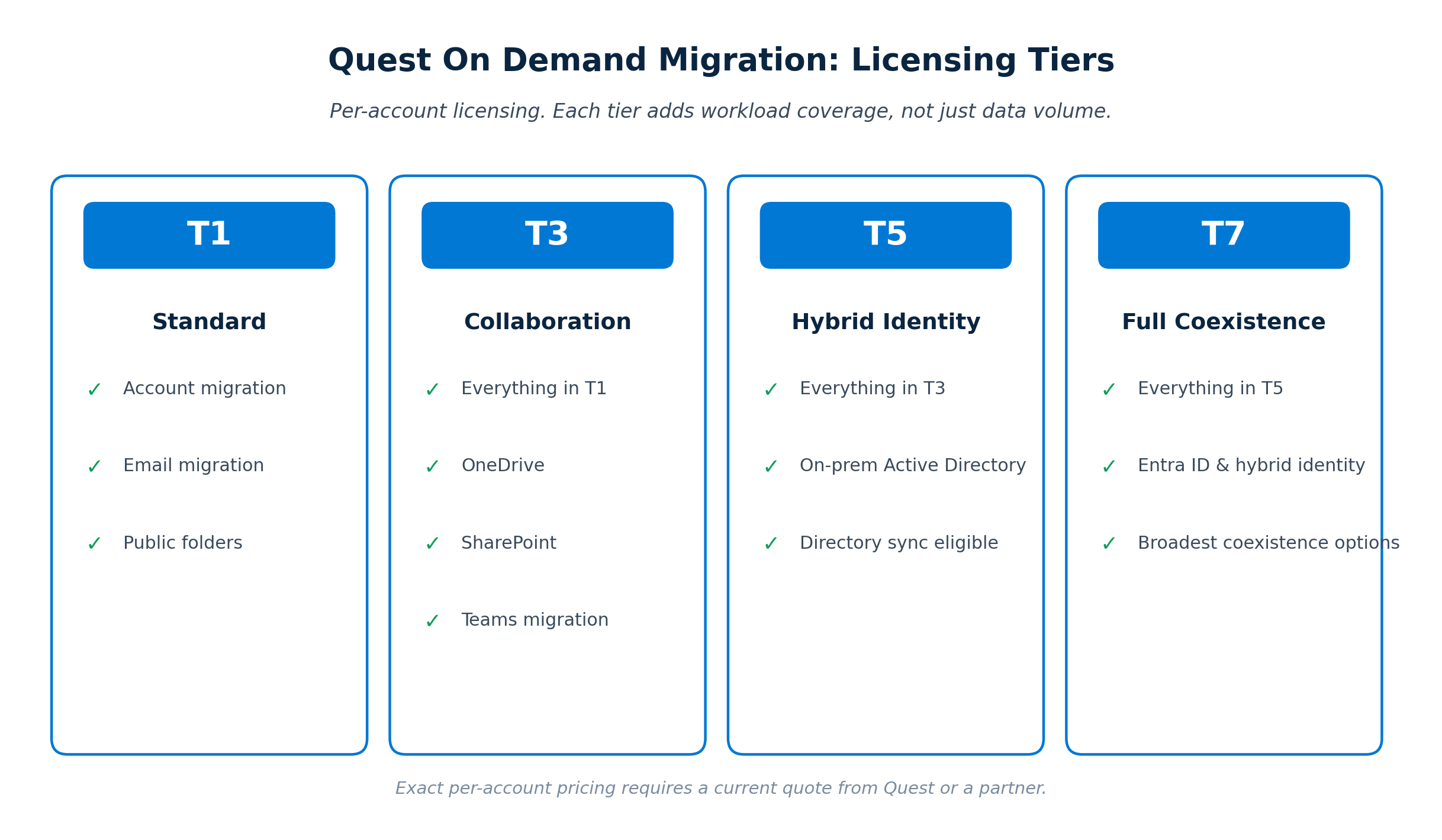
Quest licenses On Demand Migration per unique source account across four suite tiers, T1 through T7, with each tier adding workload coverage rather than just more capacity, plus separate add-ons for directory sync, domain rewrite, and device migration. There’s no published per-account rate; pricing comes through Quest Sales or a partner, but the tier structure itself is consistent and documented.
| Tier | Includes |
|---|---|
| T1 (Standard) | Account migration, email migration, public folders |
| T3 (Collaboration) | Everything in T1, plus OneDrive, SharePoint, and Teams migration |
| T5 (Hybrid Identity) | Everything in T3, plus on-premises Active Directory and directory sync eligibility |
| T7 (Full Coexistence) | Everything in T5, plus Entra ID and hybrid identity, and the broadest coexistence options |
On top of a tier, several add-ons are sold separately and typically priced per account or per object: Directory Sync (per published object, keeps users and groups synchronized during migration), Domain or Email Rewrite (presents one email brand across tenants during coexistence), Domain Move, and a device migration add-on for workstations. Domain Coexistence specifically must be purchased in equal quantity to your base ODM license count.
What Actually Consumes a Quest License?
A Quest license is tied to a unique source account and reserved the moment that account is matched to a destination, but it’s only permanently consumed once the migration task for that account actually starts, and several common object types never consume a license at all. This distinction matters more for budgeting than most of the tier structure above.
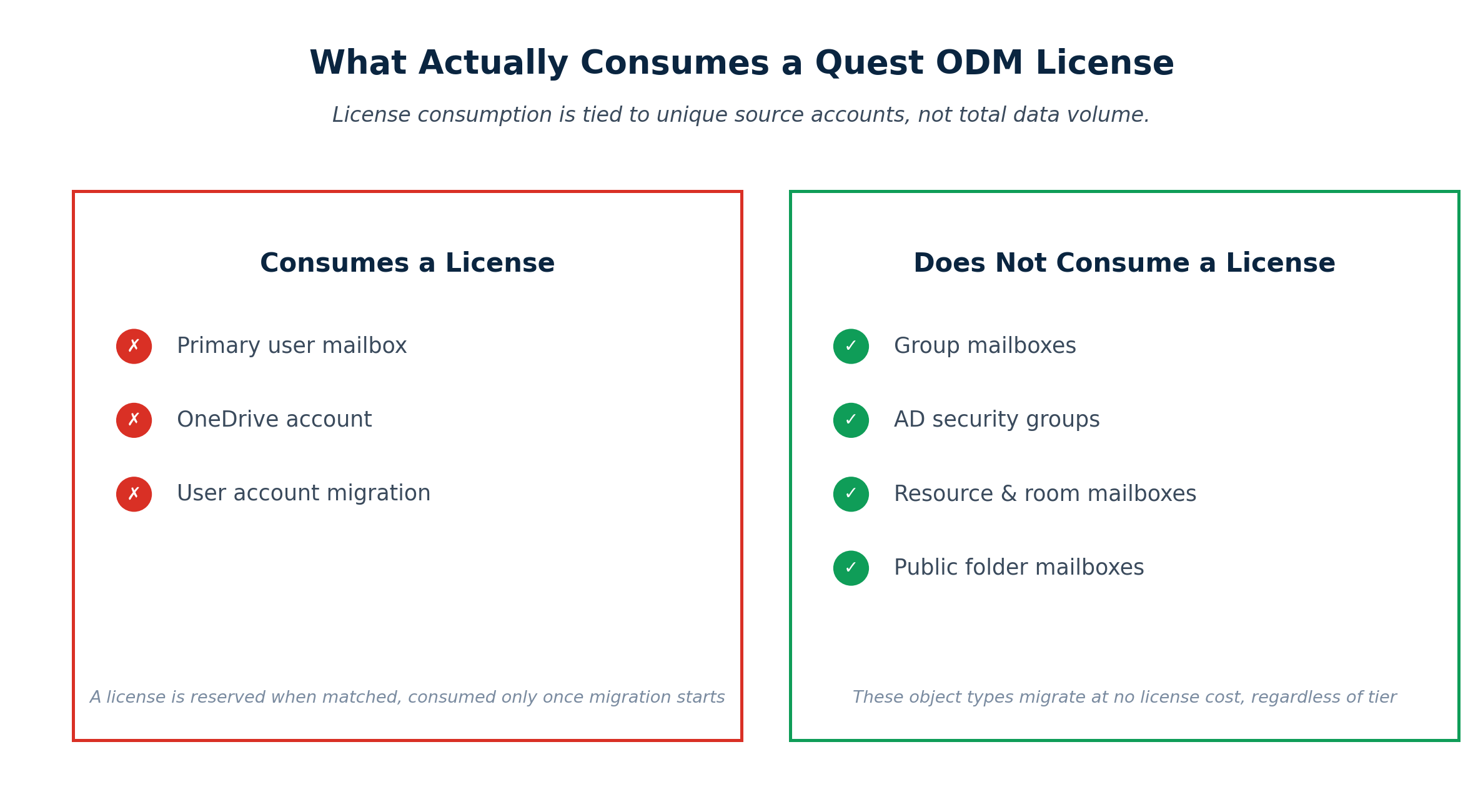
- Reserved vs. consumed. Matching an account to a destination reserves a license. That reservation can be freed by unmatching the account. Once the migration task actually runs, the license is consumed permanently and cannot be freed back to the pool.
- What doesn’t cost a license. Group mailboxes, Active Directory security groups, Exchange resource and room mailboxes, and public folder mailboxes all migrate without consuming a license, regardless of which tier you’re on.
- Exchange licenses auto-upgrade. If a tenant has both an Exchange-only license and a tier license (T3, T5, T7), the Exchange license is consumed first. If that same account later needs a OneDrive or Teams chat migration, the Exchange license is returned and a tier license is consumed instead.
Why Doesn’t Quest Publish Self-Serve Pricing?
Quest positions On Demand Migration for enterprise-scale, identity-heavy migrations, mergers, acquisitions, and divestitures involving coexistence and Active Directory, where pricing legitimately varies by workload mix, account count, and how long coexistence needs to run. That’s a different sales motion than a self-service tool aimed at a single admin buying a license with a credit card.
Independent reviewers consistently describe Quest’s pricing as fair for what it delivers, though noticeably above simpler per-user tools once you factor in tier and add-on costs. That premium tends to be easiest to justify when coexistence or directory migration is a genuine requirement, not just a nice-to-have.
Not sure which Quest tier your migration actually needs?
Apps4Rent can assess your workload mix and coexistence requirements, then get you an accurate Quest quote instead of guessing between tiers.
What Does the Quote Process Not Include?
A Quest quote gets you per-account pricing for a tier and whatever add-ons you select. It does not include choosing the right tier for your actual workload mix, planning the coexistence window, or running the migration once licenses are purchased. For a tool this configurable, getting the tier choice wrong is an expensive mistake to make alone.
- Tier selection. Buying T7 when T3 would cover your actual workloads wastes budget. Buying T3 when you need Active Directory coexistence means a mid-project upgrade.
- Coexistence planning. Directory sync and domain rewrite are powerful but need to be configured and timed correctly, since they’re what keeps users productive mid-migration, not just a checkbox.
- Execution and monitoring. Wave-based batching across Exchange, OneDrive, SharePoint, and Teams still needs to be planned and actively monitored, same as any migration tool.
- Post-migration validation. Confirming coexistence wound down cleanly and all data landed correctly is a manual step the license doesn’t automate.
What’s Included in an Apps4Rent Managed Quest Migration?
An Apps4Rent managed migration handles tier selection and quote procurement alongside the full project, planning, coexistence configuration, execution, and validation, so Quest’s complexity works in your favor instead of against your timeline.
- Workload and tier assessment. Matching your actual Exchange, OneDrive, SharePoint, Teams, and Active Directory needs to the right tier before any quote is requested.
- Quote and procurement handling. Getting accurate, current pricing from Quest and managing the licensing purchase as part of the engagement.
- Coexistence configuration. Setting up directory sync and domain rewrite correctly so users stay productive throughout a staged migration.
- Execution and monitoring. Wave-based migration across all workloads, run by engineers who work with Quest’s platform regularly.
- Validation and cutover. Confirming data integrity and cleanly winding down coexistence before the project closes.
Quest vs. Managed Migration: Side by Side
| Cost Factor | DIY with a Quest Quote | Apps4Rent Managed Migration |
|---|---|---|
| Getting an accurate quote | Self-navigated sales process | Handled by a team that prices this tool regularly |
| Tier selection | Risk of over- or under-buying | Assessed against actual workload mix |
| Coexistence setup | Internal configuration and testing | Configured by engineers familiar with the platform |
| Execution and monitoring | Internal IT time, learning curve on first run | Handled end to end |
| Accountability if something breaks | Falls entirely on your internal team | Single point of contact, 24/7 support |
When Does DIY Quest Actually Make Sense?
A self-run Quest migration fits organizations with an IT team that has handled AD or Entra ID migrations before, a genuine coexistence requirement, and enough scale, typically several hundred seats or more, to justify the tool’s complexity. Quest’s own strength, deep coexistence and identity migration tooling, is overhead for a small, simple cutover.
For a migration without coexistence requirements or Active Directory involved, a simpler per-user tool like BitTitan or a flat-rate tool like ShareGate is usually a better fit, both on cost and on not paying for capability you won’t use.
How Do You Choose Between a Quest Quote and a Managed Migration?
The decision comes down to whether coexistence and identity migration are genuine requirements, and whether your team has the bandwidth to manage both an enterprise procurement process and a live migration at once. A few questions worth asking first:
- Does your migration involve on-premises Active Directory or Entra ID, not just mailbox and file data?
- Do users need day-one coexistence, shared address lists, free/busy, mail routing, between tenants during a staged move?
- Is your account count large enough that Quest’s premium over simpler tools is easily justified?
- Has your team priced and run a Quest migration before, including choosing the right tier the first time?
If coexistence genuinely matters and the answer to the last question is no, a managed migration typically pays for itself by avoiding a tier mismatch alone, let alone the execution risk of a first attempt at coexistence configuration.
Already know you need coexistence and Active Directory migration?
Apps4Rent runs Quest On Demand Migration projects regularly and can scope the right tier and add-ons before you talk to sales.
Quest is one of several tools Apps4Rent works with as part of a broader Microsoft 365 tenant migration engagement, alongside standard mailbox and workload migrations for organizations not moving between tenants.
FAQs About Quest On Demand Migration Pricing
-
How much does Quest On Demand Migration cost?
There is no published self-serve price. Quest licenses per unique source account across four tiers (T1 through T7), with pricing available through Quest Sales or a partner. Reviewers generally describe it as priced fairly for the capability, though above simpler per-user tools once tiers and add-ons are factored in.
-
What’s the difference between Quest’s T1, T3, T5, and T7 tiers?
T1 covers account, email, and public folder migration. T3 adds OneDrive, SharePoint, and Teams. T5 adds on-premises Active Directory and directory sync eligibility. T7 adds Entra ID, hybrid identity, and the broadest coexistence options.
-
Does every migrated account consume a Quest license?
No. Group mailboxes, Active Directory security groups, Exchange resource and room mailboxes, and public folder mailboxes do not consume a license under any tier. Licenses are tied to accounts like user mailboxes and OneDrive accounts, and are only permanently consumed once a migration task starts.
-
Is Quest On Demand Migration more expensive than BitTitan or ShareGate?
Generally, yes, per account, though the comparison depends heavily on what you need. Quest’s premium is typically justified by coexistence and Active Directory capabilities that simpler per-user tools don’t offer at all.
-
Is there a free trial for Quest On Demand Migration?
Yes. A 30-day trial is available, limited to 5 accounts with reduced data caps per workload, enough to evaluate the platform before committing to a tier and quote.
-
Can Apps4Rent help get an accurate Quest On Demand Migration quote?
Yes. Apps4Rent’s migration engineers can assess your workload mix and coexistence requirements, recommend the right tier, and manage quoting and procurement as part of a fully managed migration engagement.
Apps4Rent – Tier 1 Office 365 Cloud Solution Provider