How to Migrate from Roundcube to Office 365?
-
 Last updated: 15 December 2025
 Migration
-
 Editorial Team
With businesses seeking more integrated and versatile platforms for their day-to-day operations, the transition from Roundcube to Office 365 represents not just a shift in tools but a significant upgrade in collaborative productivity and efficiency. With over 300 million active users on Office 365, Microsoft’s powerhouse suite has dominated the market, leading the charge in productivity and collaboration tools.
However, statistics show a compelling narrative; businesses that migrate to more comprehensive platforms like Office 365 can experience up to a 30% increase in productivity. Moreover, with over 60% of sensitive corporate data now being exchanged through email, the enhanced security features of Office 365 present a critical upgrade from platforms like Roundcube.
The question then becomes, how does one undertake the intricate migration journey without throwing a wrench in the gears of daily business operations?
This blog will cast light on the path from the open-source simplicity of Roundcube to the sophisticated ecosystem of Office 365. Whether you’re a small business owner, an IT professional, or someone tasked with ensuring a seamless transition, this post will equip you with essential insights and step-by-step instructions to ensure a smooth migration.
What is Roundcube Email, and Why Consider Migrating to Office 365?
Roundcube is a popular, open-source webmail client prized for its simplicity and clean interface. Many businesses and individuals encounter it as the front-end for their email, often provided by hosting companies, allowing them to access their IMAP mailboxes directly from a browser. For years, it has served as a reliable and straightforward solution for sending and receiving messages.
However, as business needs evolve beyond basic email, the limitations of a standalone webmail client become apparent. The shift to a platform like Office 365 is not merely about changing your inbox; it is about transitioning from a simple communication tool to a comprehensive productivity hub. While Roundcube handles email, Office 365 integrates powerful applications like Word, Excel, Teams, and SharePoint, transforming how teams create, collaborate, and communicate. Moving from Roundcube to Office 365 unlocks a unified ecosystem designed for the modern, dynamic workplace, leaving the constraints of isolated email management behind.
Key Benefits of Migrating from Roundcube to Office 365
You must be pondering the benefits of migrating from Roundcube to Office 365. Let’s delve into the compelling reasons that make this move not just a choice but a strategic decision for modern businesses.
-
Enhanced Collaboration
Office 365 enhances collaborative efforts with co-authoring capabilities and integrated communication tools. This allows for real-time document editing and synchronization, which is critical for team-based projects and maintaining version control across the workforce. By using Microsoft Project organizations can plan, create, assign, and monitor employee task progress.
-
Security Fortification
Transitioning to Office 365 introduces advanced security protocols for protecting sensitive corporate data. The suite includes encryption, threat detection, and data loss prevention, ensuring comprehensive security coverage that aligns with industry compliance standards. With Microsoft Defender for Office 365, organizations are better protected from malware, receive real-time security notifications, and have access to robust web protection.
-
Anywhere Access
Migrating to Office 365 from Roundcube is a strategic decision for any enterprise seeking ubiquitous access. Office 365 provides a cloud-based environment where users can access emails and Office suite applications across devices and locations, optimizing for remote work scenarios and business continuity.
-
Cost Optimization
The subscription-based model of Office 365 mitigates significant upfront investments in software infrastructure. It offers a scalable, pay-as-you-go approach for access to enterprise-grade applications, allowing for better cash flow management and cost predictability.
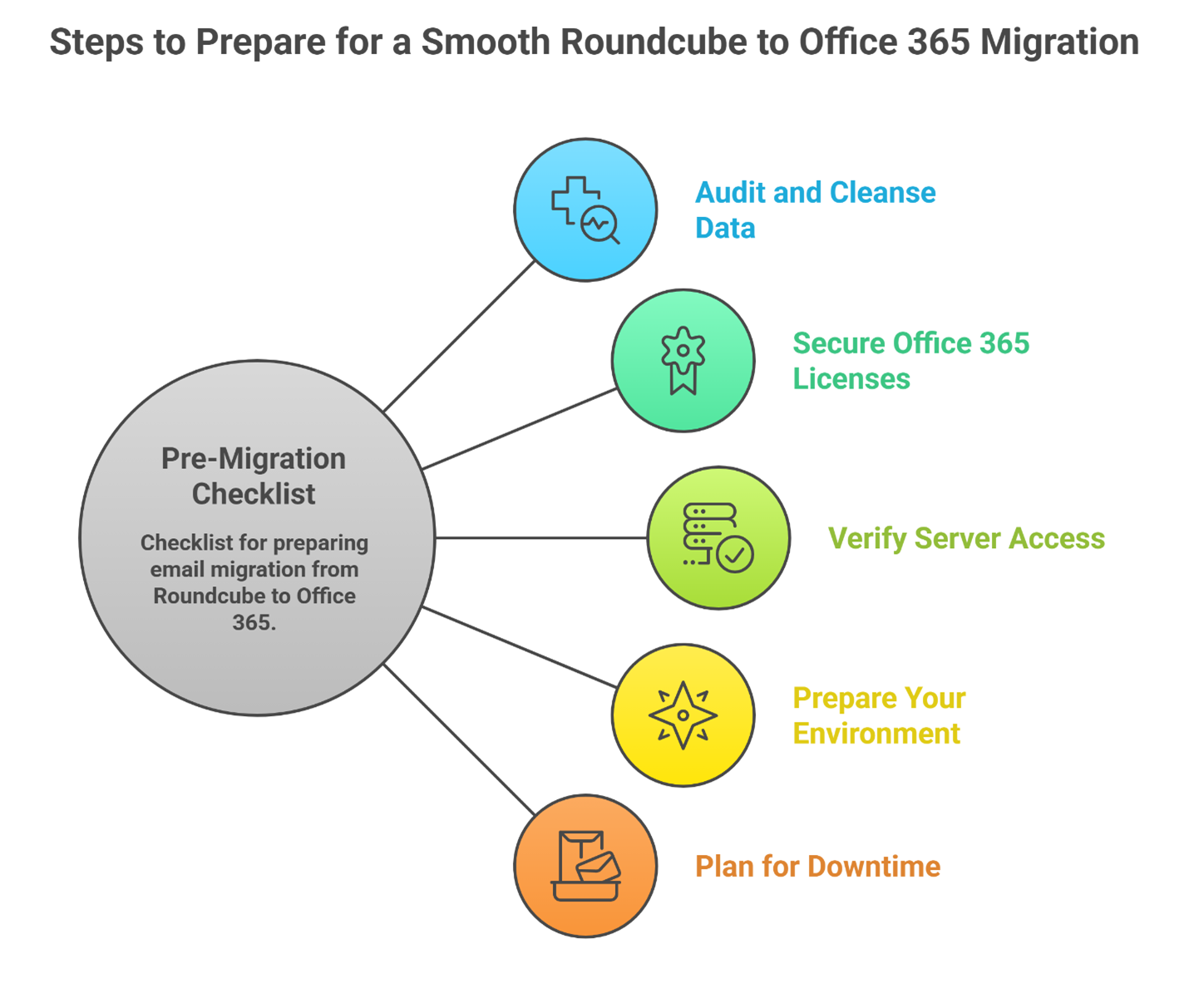
Pre-Migration Checklist: What to Prepare Before Moving Emails
A successful migration hinges on thorough preparation. Before initiating the process to migrate email from Roundcube to Office 365, addressing a few key areas can prevent complications and ensure a smooth transition.
- Audit and Cleanse Your Data: Begin by reviewing your current Roundcube mailbox. Archive or delete old, unnecessary emails to reduce the volume of data you need to transfer. A smaller, cleaner mailbox accelerates the migration.
- Secure Office 365 Licenses: Ensure you have purchased and assigned the appropriate Office 365 licenses to all users who will be migrated. Active licenses are required for mailbox creation.
- Verify Roundcube Server Access: Confirm you have the necessary server details and credentials for your Roundcube mailboxes. You will typically need the IMAP server address, port numbers, and user passwords. Having this information readily available is crucial for both manual and professional migration methods.
- Prepare Your Environment: For a manual migration, ensure a machine with Outlook installed and a stable, high-speed internet connection is available. For larger deployments, inform your team about the migration schedule to minimize disruption and set clear expectations.
- Plan for Downtime: While a professional migration service can often minimize this, it is wise to plan for a brief period where email access might be intermittent, especially during the final switch of your domain’s MX records to point to Office 365.
Roundcube to Office 365 Migration Methods
Method 1: Manual Roundcube to Office 365 Migration
Step 1: Configuring Roundcube Email within Outlook
- Initiate Microsoft Outlook on your system.
- Access File > Add Account.
- Submit your Roundcube email credentials.
- Select Let me set up my account manually, and then choose Advanced options.
- Proceed with Connect and specify IMAP or POP3 as the server type.
- Enter server details and corresponding port numbers.
- Authenticate with your Roundcube password and establish the connection.
Step 2: Conversion of Outlook Data to PST Files
- Launch Outlook and navigate to File > Open & Export > Import/Export.
- Choose Export to a file and continue with Next.
- Select Outlook Data File (.pst), then select Next.
- Designate the Roundcube email folders to export.
- Define the storage path for the PST file.
- Assign a filename and then select Finish.
Step 3: Uploading PST Files via Network Upload
Use the network upload method for PST to Office 365 transfer.
- Download AzCopy, secure the SAS URL, and upload your PST.
- Validate the PST upload list.
- Construct a PST import mapping file.
- Initiate an import job within the Office 365 Security & Compliance Center.
- Implement data filtering on the PST import job if necessary.
Begin this technical migration precisely, transitioning your Roundcube email data to Outlook with minimal disruption.
Method 2: Professional Migration with a Specialized Service Provider
Apps4Rent simplifies your migration from Roundcube to Office 365 with a flawless, expert-led migration service. As a trusted Microsoft partner, our seasoned professionals ensure your data’s integrity and operational continuity with minimal disruption. Our expertise extends beyond standard mailbox moves to more complex scenarios like a comprehensive Office 365 tenant to tenant migration. Leveraging advanced tools and meticulous planning, we migrate more than just emails. We help you transfer calendars, contacts, and files while providing ongoing support post-migration. Our goal isn’t just to upgrade your systems and enhance your business workflow with Office 365’s collaborative and secure platform.
Why Choose a Professional Migration Service Over a Manual Process?
The manual method outlined earlier provides a viable path for a single user with technical confidence. However, for a business of any significant size, the choice between a manual process and a professional service is critical. While the manual approach seems cost-effective, it carries hidden expenses in time, potential for error, and operational risk.
A professional migration service, like Apps4Rent’s Office 365 migration service, transforms a complex technical project into a managed, predictable outcome. Our experts handle the entire process, from planning to execution, using specialized tools that ensure data integrity and security. This managed approach is highly recommended not just for Roundcube, but for any complex move, such as when you migrate from GoDaddy to Office 365.
We manage the transfer of not just emails, but also calendars, contacts, and tasks, which the manual PST method can struggle with. This approach eliminates the burden on your internal IT team, guarantees a faster transition with minimal downtime, and provides expert support to resolve any unforeseen challenges.
Roundcube to Office 365 Migration Advanced Features
Let’s check out some of the advanced features that come with Roundcube to Office 365 migration:
-
Batch Migration Capability
The migration tool introduces batch processing, utilizing CSV input to facilitate the simultaneous migration of multiple user accounts. This feature significantly expedites the migration process by allowing the concurrent transfer of a batch of bills.
-
Bulk and Targeted Data Transfer
With the ability to perform both bulk and selective migration, the tool offers users the flexibility to transfer entire directories or specific folders and subfolders, tailoring the migration to particular data sets.
-
Extensive Language Interface
The tool’s interface supports multiple languages, catering to a global user base. It includes, but isn’t limited to, English, Spanish, German, Dutch, Finnish, Norwegian, and Italian, ensuring accessibility for non-English speakers.
-
Sophisticated Data Filtering
An advanced filtering system enables precise data migration. Users can target specific emails for transfer based on parameters such as date ranges, recipients, senders, and subject lines, streamlining the migration of relevant data.
-
Broad Windows OS Integration
Compatibility with a range of Windows operating systems, from the latest Windows 11 to older versions like Windows 7, guarantees accessibility for users across various Windows platforms.
-
Data Structure and Integrity
The migration tool is meticulously designed to maintain the original email folder hierarchy and components, including headers and body content, thus ensuring the organizational structure and data integrity are preserved post-migration.
-
Utilization of Advanced Algorithms
Employing sophisticated algorithms, the tool enhances the efficiency and user experience of the migration process. These algorithms are tailored to support users with diverse technical expertise, ensuring a smooth transition for all stakeholders.
Common Migration Challenges and How to Fix Them
Even with careful planning, you might encounter hurdles during your Roundcube to Office 365 migration. Recognizing these common issues can help you address them promptly.
- Authentication Failures – The migration tool or Outlook cannot connect to the Roundcube mailbox.
- Solution: Double-check your IMAP server settings and user passwords. Ensure that the Roundcube server is accessible from your network and that IMAP access is enabled by your hosting provider. These connection issues are common when migrating from various hosting providers, a challenge also frequently encountered during an A2 Hosting to Office 365 migration.
- Stalled or Slow Migration.
- Solution: This is often related to large item sizes or network latency. Implementing data filters to exclude very large emails can help. For professional migrations, we throttle the speed to avoid overwhelming the source server.
- Missing Folders or Emails Post-Migration.
- Solution: Verify the mapping of folders between the source and destination. Special folders like “Sent Items” or “Junk” may need specific mapping rules. A professional tool ensures the folder hierarchy is perfectly preserved.
- PST File Corruption (Manual Method).
- Solution: PST files can become corrupted during creation or transfer, leading to data loss. Using reliable tools and having verified backups is essential. A direct, tool-assisted migration bypasses the PST stage entirely, mitigating this risk.
Post-Migration Tips: Verifying Data and Optimizing Office 365
Once the migration is complete, your journey with Office 365 is just beginning. A few key steps will ensure the transition is fully successful and your team can leverage the platform’s full potential.
- Conduct a Thorough Data Verification: Do not assume the migration was 100% successful. Select a sample of users and have them check their new Office 365 mailboxes. Confirm that folder structures are intact, and spot-check emails from different time periods to ensure completeness.
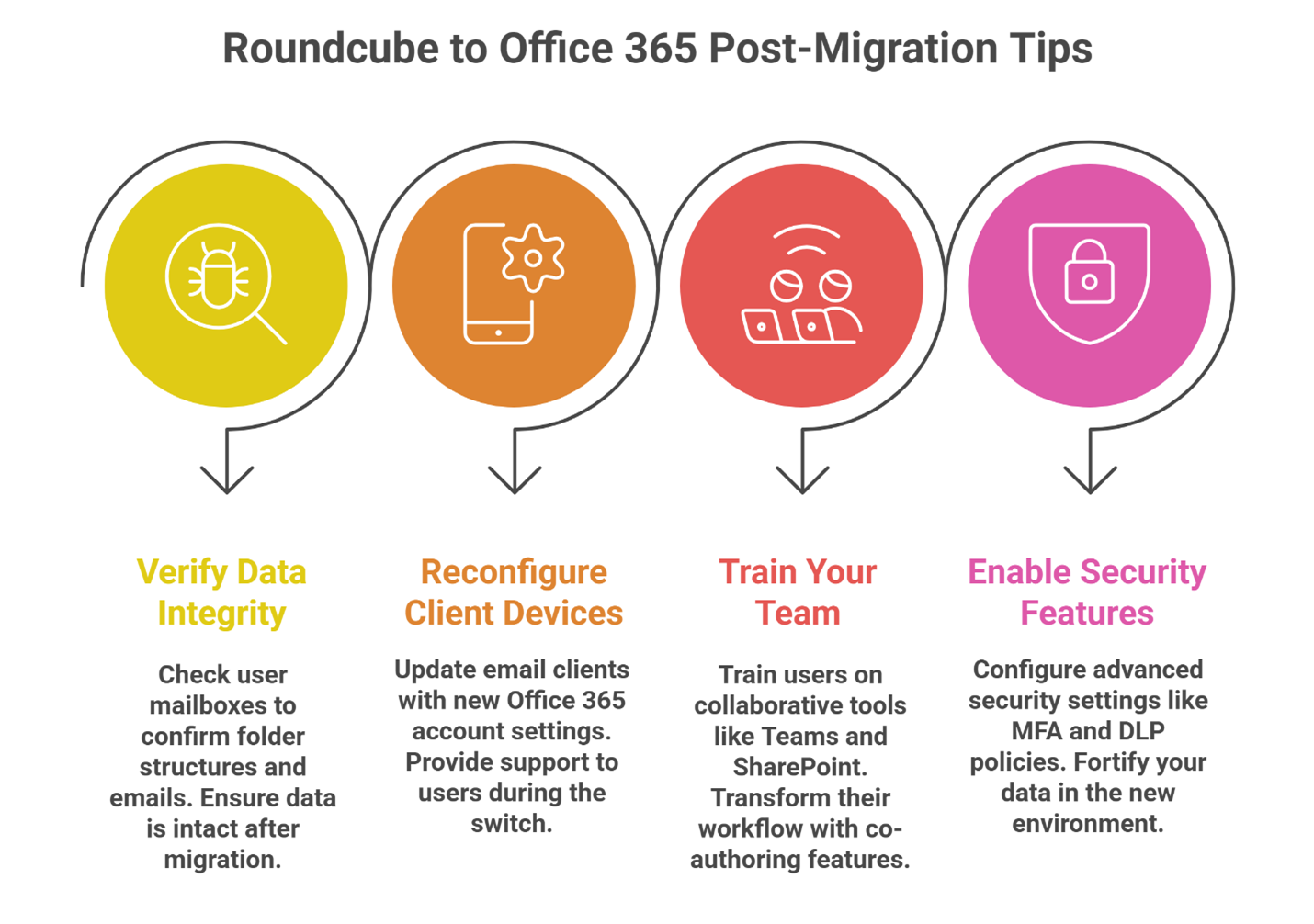
- Reconfigure Email Clients: Update all devices (phones, tablets, desktop Outlook) with the new Office 365 account settings. Autodiscover should simplify this process, but be prepared to assist users with the changeover.
- Train Your Team: The real value of migrating from Roundcube to Office 365 is unlocked through use. Schedule training sessions or provide resources on using collaborative features like Teams, SharePoint, and co-authoring in Word and Excel. This moves your team from simply using a new email client to embracing a new way of working.
- Explore Security and Compliance Settings: Take time to configure the advanced security features you now have access to, such as multi-factor authentication (MFA) and data loss prevention (DLP) policies, to fortify your corporate data.
Catalyze Business Evolution with Strategic Migration
The transition from Roundcube to Office 365 marks a definitive step toward modernizing business operations. Office 365 offers a seamless integration of familiar applications and new technologies that foster collaboration, streamline processes, and secure corporate data.
As a Microsoft Solutions Partner, Apps4Rent actively steers your Office 365 email migration journey, ensuring it’s as smooth as it’s impactful. From pre-migration to post-migration, we remain at your side to provide dedicated support to address your queries and offer solutions.
The pathway to Office 365 is a conversation away. Our team stands ready to engage 24/7/365, eager to take your call and navigate every step alongside you.
FAQs on Roundcube to Office 365 Migration
-
How to import emails from Roundcube to Office 365?
You can import emails manually by first connecting Roundcube to Outlook, exporting your data to a PST file, and then uploading that PST to Office 365. For a more direct and efficient process, especially for multiple users, a professional service like Apps4Rent can automate the entire import directly from the source.
-
How to convert Roundcube to Outlook?
Roundcube itself isn’t “converted.” Instead, you configure your Roundcube email account within Microsoft Outlook using IMAP settings. This allows Outlook to display and manage your Roundcube emails, which is a key step in the manual migration process before exporting to a PST file.
-
Can I migrate contacts and calendar data from Roundcube to Office 365?
Yes, but it depends on the method. The manual PST method typically only transfers emails. Migration service providers like Apps4Rent, however, migrate not just emails but also your contacts and calendar data.
-
Is there a free method to migrate Roundcube emails to Office 365?
Yes, the manual method using Outlook and PST files is a free, built-in approach. It is best suited for a single mailbox.
-
How long does it take to migrate Roundcube emails to Office 365?
The duration depends on the amount of data and the method used. A single mailbox might take an hour or two manually. For an entire organization, migration can take a few hours to a couple of days.
-
What are the limitations of manual migration?
The manual process is time-consuming, technically complex, and prone to errors like PST corruption. It typically only moves emails, not contacts or calendars, and lacks batch processing.
-
Do I need admin access to migrate Roundcube emails to Microsoft 365?
For a single-user manual migration, you may only need your own credentials. However, to migrate an entire organization and manage users in the Microsoft 365 admin center, global administrator access is essential.
-
Will the folder structure remain intact after migration?
With a professional migration tool, yes, your folder hierarchy is meticulously preserved. The manual PST method generally maintains the structure, but it can sometimes be less reliable with special folders.
-
Can I migrate Roundcube emails to Office 365 without using Outlook?
Yes. The manual PST method requires Outlook, but automated migration tools and professional services like the one from Apps4Rent connect directly to the Roundcube server and Office 365, completing the transfer without needing Outlook as an intermediary.
-
What should I check after migrating Roundcube to Office 365?
After migration, verify that a sample of emails, contacts, and calendar entries have transferred correctly. Check that folder structures are intact, test sending and receiving new emails, and ensure all user devices are reconfigured to connect to Office 365.
Apps4Rent – Tier 1 Office 365 Cloud Solution Provider